The Shakes & Fidget bot that plays the boring parts for you
Mercy SF is a free Shakes & Fidget bot that runs quests, arena, dungeons, fortress, pets and guild on its own, and shows you exactly what it decided and why. One app, every platform, every feature unlocked.
No account needed to download. No paywall, no licence, no trial.
Every feature free
Windows, macOS & Linux
Runs on your machine
Signed auto-updates
Mercy SF
26
automation modules
from quests to the Hellevator
10
app languages
fully translated, not machine-guessed
3
platforms
one codebase, identical behaviour
€0
no tiers, no licence key
Everything on autopilot
Shakes & Fidget is a game of daily chores. Mercy SF does the chores. You keep the decisions that are actually interesting.
Quests, tavern & expeditions
Picks quests by what you actually want, whether that is experience, silver or an item, spends beer when it is worth spending, and runs expeditions when the server has them. Handles the thirst-for-adventure reset without wasting a single unit.
Arena
Fights the opponents worth fighting. It reads the Hall of Fame, simulates the fight first, and skips anyone it would probably lose to. Free fights, honour swings and the city guard are all part of the decision, and it names the reason on screen.
Dungeons & the tower
Runs light and shadow dungeons, retries the ones that became winnable after a level, and stops before it burns a key on a fight it cannot take.
Pets
Explores pet dungeons, fights pet arena battles, feeds every habitat, and brews juice when the fruit is there. Tracks which pets you are missing.
Guild
Portal, hydra, raids, attack and defence, all joined automatically, plus the daily guild instructor and the fortress donation.
Battle simulator
Replays any fight thousands of times before it happens, so 'should I attack this player' has a number instead of a feeling. Works for arena, dungeons and guild fights.
World Boss, the Hellevator and the Legendary Dungeon appear for a week or two and then vanish again. They are the parts of Shakes & Fidget that cost the most clicks and reward the most attention. Mercy SF works out which one is actually live, joins it, and keeps at it overnight.
Keeps the catapult supplied, re-aims at the segment that is currently the weak point, and collects the free daily chest and every battle reward. Ammunition costs catalysts and upgrades cost resources. It never presses the mushroom button.
Chests collected, weak point tracked, never paid in mushrooms
Climbs while climbing is worth it, takes yesterday's reward and today's in the same pass, and spends spare key cards on the treat with the best effect per card instead of the first one the shop lists.
Chooses doors, fights the encounters and reads the effects of the run. Reviving costs mushrooms, so it holds two ceilings, one for the day and one for the single run, and stops at whichever comes first.
Room by room, with a mushroom ceiling you set
None of this fires blindly. The game keeps sending World Boss data long after the event closes, so Mercy SF checks each event's own window, believes the server when it says an event is over, and stays quiet until a new one starts.
Most bots attack whichever three opponents the arena offers. Mercy SF crawls the Hall of Fame in the background, remembers what every player it has seen is wearing, and sends the next attack at the beatable player holding the most items your scrapbook is still missing. The album fills while you are not looking.
A server start is decided in the days when nobody is watching, and it is decided by the order things are done in rather than by how hard anybody clicks. Switch the opening on and Mercy SF unlocks each feature the moment the level allows it, puts the free fights into the scrapbook while the album is still empty and every item is new, keeps the thirst for adventure spent rather than sitting full, and takes the wheel every day from day one.
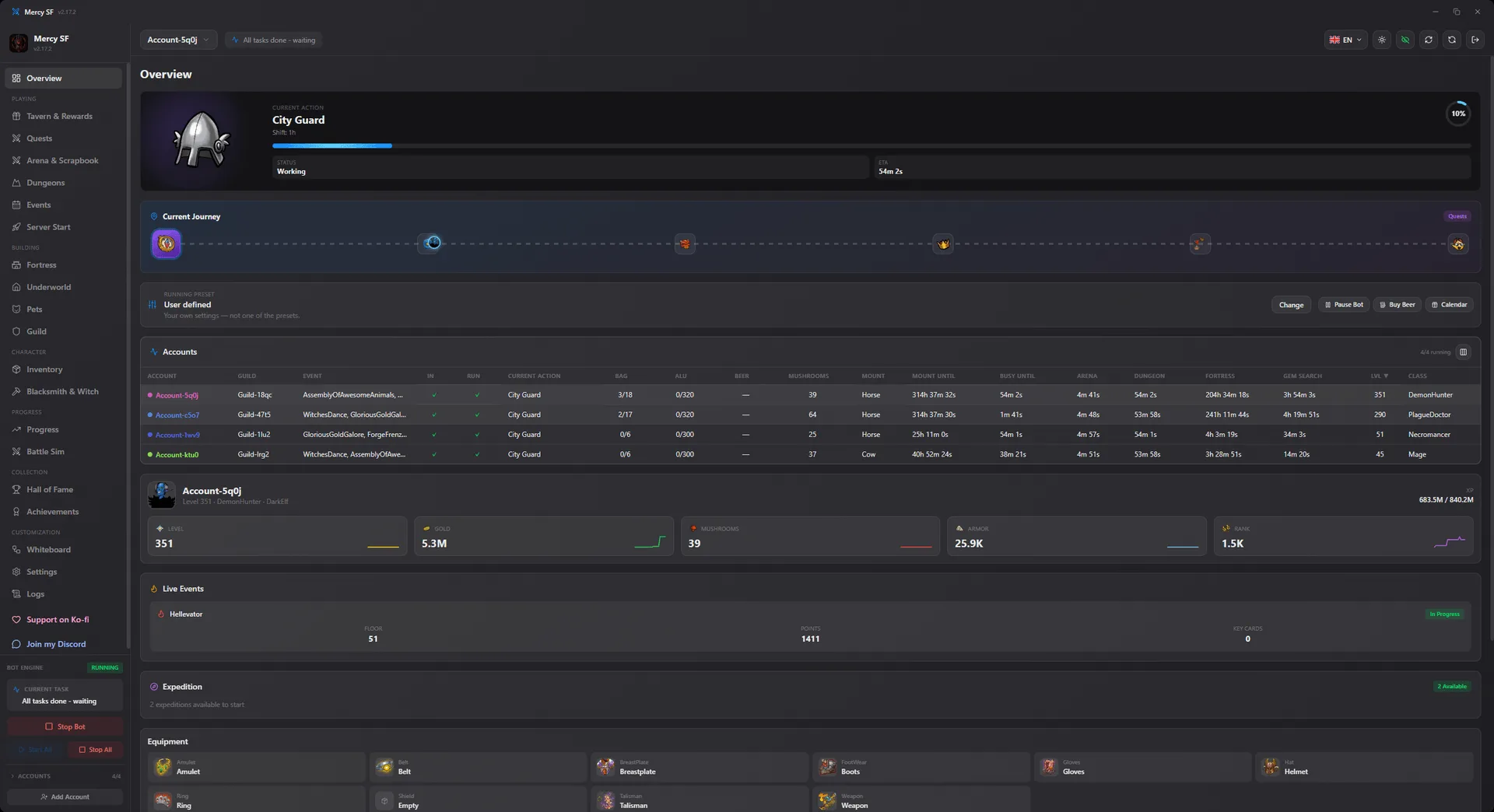
Not a marketing render. These are the real screens, taken from a running install. Click any of them to look closer.
01Overview
What every character is doing right now, in one table, with the running event and the next thing due.
02Character & gear
Every slot the character is wearing, with the attributes each piece brings.
03Tavern & rewards
Toilet, calendar, wheel and dice. The daily clicks, taken while you are not there.
04Quests & expeditions
The three quests on offer, ranked by what they pay per second, and the beer left to spend.
05Arena
Not a list of opponents, a ranking. Every candidate scored, and the one it will fight highlighted.
06Scrapbook
How full the album is, and which monsters and items are still missing from it.
07Battle simulator
Replays the fight thousands of times, so the odds are a number before you commit.
08Hall of Fame
Scout any player on the server and compare their gear with yours before attacking.
09Dungeons & tower
Light and shadow dungeons, the Twister and the Tower, with the retries that became winnable.
10Events
A live event gets its own page: the climb so far, the treats on offer, and what happens next.
11Server start
The opening on a fresh server, as a checklist: what is unlocked, what is next, how far along it is.
12Fortress
Wood, stone and the gem mine, with every building and the order it is being upgraded in.
13Underworld
Souls, silver and the upgrade order that actually pays off, plus the daily raids.
14Pets
Every habitat, which pet is fed, which is missing, and the attributes the collection grants.
15Guild
Portal, hydra, raids, attack and defence, joined without you being there.
16Inventory
Your gear, potions and backpack, mirrored from the game, with what each item would replace.
17Blacksmith & witch
Dismantles what is not worth keeping, upgrades what is, and keeps enough metal back to save your gems.
18Achievements
All 92 achievements, how far along each is, and the ones the bot can reach on its own.
19Progress report
What actually happened while you were away, totalled up and broken down by where it came from.
20Analytics
Experience, silver, honour and win rate over time, so last week's setting change has an answer.
21Whiteboard
Draw the cycle yourself. Drag a box onto another to place it in the order, click a line to cut it.
22Settings
A switch for every module, applied the moment you flip it, and separate for every character.
23Mushroom spending
Everything that can cost real money, on one page, off by default, with a floor and a rate limit.
Use the arrow keys to move between screens.
Why this one
There are other Shakes & Fidget bots. Three things make this one different.
It tells you what it is thinking
The arena panel does not just say 'waiting'. It names the opponent it will fight next and the reason it picked them: win chance, scrapbook gap, honour swing. When it does nothing, it says why it is doing nothing.
Native, not a browser in a costume
Built with Rust and Tauri 2. No Electron, no bundled Chromium, no Node runtime sitting in the background eating a gigabyte. It starts fast and stays out of the way.
Free, and it stays free
Every module is unlocked for everyone. There is no supporter tier that gets the good features, no licence key, and no countdown. Donations are welcome and buy you nothing but goodwill.
Your account stays yours
The bot talks to the same official Shakes & Fidget endpoints your browser already uses. It does not modify the game, and it does not phone home with your data.
Credentials never leave your machine
Logins are stored locally and encrypted. There is no account server holding them.
No ads, no tracking, nothing sold
Nothing about how you play is collected or sold: no account names, no characters, no progress, nothing out of the game state. Your credentials stay encrypted on your own machine.
Signed updates
Every build is signed with the same key and verified by the updater before it installs, so a tampered download cannot become an update.
Nothing hidden in the installer
No bundled toolbars, no miners, no second program. One app, one process.
Running in about a minute
No configuration files, no command line, no technical knowledge.
1
Download
Pick the installer for your system. Windows, macOS and Linux are all first-class.
2
Add your character
Sign in with your Shakes & Fidget account inside the app. Add as many characters as you like.
3
Choose what it may do
Turn modules on one at a time, or turn everything on. Every toggle applies immediately.
4
Start it
Press start. Minimise to the tray and let it work.
If yours is not here, the docs go deeper, or ask in the forum.
What is Mercy SF?
Mercy SF is a desktop application that plays the repetitive parts of Shakes & Fidget for you. It runs quests, arena fights, dungeons, the fortress, the underworld, pets, the guild and the daily rewards, and it explains each decision it makes. It is free, it runs on Windows, macOS and Linux, and every feature is available to everyone.
Is Mercy SF really free?
Yes. Every module is unlocked for everyone. There is no premium tier, no licence key, no trial period and no feature held back for donors. Ko-fi donations are welcome and unlock nothing. They are a thank-you, not a purchase.
Is Mercy SF a Shakes & Fidget mod?
No. It is a standalone program, not a modification of the game client. It talks to the same official Shakes & Fidget endpoints your browser already uses, so nothing is injected into or patched in the game itself.
Is it safe to use?
The app runs entirely on your machine and stores your login details locally, encrypted. Nothing about how you play is sent to any server. That said, automating an account can be against the game's terms of service, and that risk is yours to take. That is why the app is deliberately conservative about how fast it acts.
Which platforms does it run on?
Windows 10 and newer (64-bit), macOS 12 and newer on both Apple Silicon and Intel, and 64-bit Linux as an AppImage or .deb. All three are built from the same source in the same pipeline, so they behave identically. There is also a headless console build for servers.
Can it run several characters at once?
Yes. Add as many accounts as you like, across as many servers as you like, in one window. Each character keeps its own settings, its own schedule and its own log.
Does the app have to stay open?
Yes, the bot runs while the app runs. You can minimise it to the system tray and it keeps working in the background. If you want it running without a desktop at all, use the headless CLI build on a server.
How do updates work?
The app checks for a new version by itself, verifies its cryptographic signature, and installs it. You never need to download an installer twice. Every build for every platform is signed with the same key, so an update that was tampered with is refused.
Do I need an account to use it?
Not for the bot. Downloading and running Mercy SF needs no account of any kind. An account on this website is only for the forum, for voting on features, and for signing in to the app when you want your settings recognised across devices.
How do I report a bug?
Use Send report in the app's Logs tab. It attaches the log around the moment things went wrong, which is almost always the part that identifies the cause. Bugs can also be posted in the forum, where other users may recognise them.
How much memory and CPU does it use?
It is built with Rust and Tauri 2 and uses the operating system's own web view, so there is no bundled browser and no Node runtime. Measured on Windows with four characters running, the whole application came to about 550 MB, and that total barely moves as you add characters: the bot itself is around 110 MB and the rest is the single web view drawing the interface. Between actions the processor is close to idle.
Where is the documentation?
At mercysf.app/docs. There is a getting-started guide, a page for each automation module explaining what its settings actually do, a troubleshooting section, and a full reference for the JSON interface of the console build.
Come and say hello
Setup help, build advice, bug reports and the argument about whether the arena floor belongs at 55 per cent. The Discord is where all of it happens, and it is where a new release gets announced first.
Every feature is unlocked for everyone. If the bot saved you an hour a day and you want to say thanks, Ko-fi is where to do it. It changes nothing in the app.